Cooper’s Hawk Chef Recommendations Menu
Find rotating chef picks for lunch and dinner, with featured prices and suggested pairings.
Browse pricesOfficial menu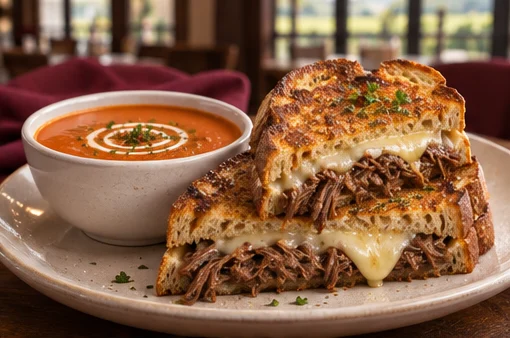
Chef Recommendations Menu at a glance
Seasonal availability can change during a visit or vary by location. The published seasonal examples below are useful for comparing portions and pairings. Check the official chef page before a special trip.
Prices are published examples. Confirm current prices and availability for your restaurant. A blank menu listing is marked as not published for calories and as check locally for price.
Seasonal chef features
| Item | Published price | Calories |
|---|---|---|
| Shaved BBQ Brisket Flatbread | $16.99 | Not published |
| Short Rib Grilled Cheese & Tomato Bisque (lunch) | $22.99 | Not published |
| Roasted Butternut Squash Ravioli with Lobster, Shrimp & Scallops (dinner) | $36.99 | Not published |
| Cooper’s Hawk Surf & Turf (dinner) | $52.99 | Not published |
| Pineapple Upside Down Mochi Cake | $12.99 | Not published |
Sides, drinks and add-ons
These are selected extras or pairing options. Ask the restaurant which combinations are available for your order.
| Item | Published price | Calories |
|---|---|---|
| Suggested wine pairing or available substitution | Check locally | Not published |
Choose from the seasonal chef features
Check the current rotation
The published seasonal page gives examples of featured dishes, pairings, and serving windows. Confirm which items the location is offering before planning a trip around a particular dish. Ask about pickup if the feature does not show in the local cart.
Choose by course
A flatbread can work as a shared starter. A sandwich-and-soup feature suits a lunch plan. For dinner, compare a pasta feature with Surf & Turf by portion and included sides. If everyone already has a favorite main, a seasonal dessert can be the only feature you add.
Read the pairing separately
Check the suggested wine against the bottle and glass lists. Ask about the glass price and whether an alcohol-free drink would work with the same course. Budget the wine separately unless the menu specifically includes it.
Verify preparation and price
A seasonal dish can have different sauces, garnishes, or sides from a similarly named regular option. Check those details and the local price before ordering. Ask staff if you need the designated preparation or allergen information.
Make a backup choice
Write down one regular menu option before visiting for a seasonal dish. If the feature has ended or that location has sold out, you can choose a similar course without restarting the order. If you are buying for pickup, check which sauces and sides can be packed separately.
Check the featured dish against a familiar choice
Use the permanent menu to find a comparable dish before deciding on a feature. Compare the cooking method and sides. A seasonal pasta with seafood and a sauce is a different kind of order from steak with vegetables, even if both are described as dinner features.
Plan a seasonal meal by courses
If the entrée is the main reason for visiting, start there and choose whether you want a shared starter or a dessert. If only one person wants to try the special, they can order it while everyone else uses the regular menu. Price each course independently so the total is easy to compare.
Use tasting notes to pick a pairing
Check whether the suggested wine is served by the glass and what it costs before including it in the meal. Ask your server how the wine works with the seasoning or sauce. If you prefer a different style, describe what you like and ask for a comparable choice within your budget.
Check all details for carryout
The feature page and the restaurant’s ordering system may show different selections. Verify the time window, whether the dish appears at your chosen location, and whether the packaging works for the meal you are planning. If it is unavailable, use the alternate entrée you picked earlier.
Explore related guides
Pick a seasonal course that improves the meal
If a new item sounds appealing, decide whether to make it the main event or one part of a larger order. A seasonal flatbread can be shared without everyone changing their entrée. A dinner feature with included sides can stand on its own. A dessert feature leaves room for each person to pick a regular main. Check which dishes are currently listed at the restaurant so you can plan a meal around selections you can actually order.
Compare the same kind of dish across menus
For a seafood pasta feature, choose a regular pasta or seafood entrée as the comparison, then check sauce, portion, sides, and price. For a seasonal steak and seafood combination, compare it with the regular Surf & Turf selections and note whether the price includes both proteins. The comparison works best when you consider what arrives on each plate. A lower listed price means less if you expect to add a side to make the portion work.
Decide on the suggested pairing separately
Read the featured wine description even if you do not plan to order it. If you like the style, ask whether the restaurant offers it by the glass and how the price compares to another wine you enjoy. If your table wants different wines, price glasses separately instead of sharing a bottle by default. You can also ask for a nonalcoholic drink that suits the dish. Keep beverage choices separate when estimating the meal total.
Budget for a complete lunch or dinner
Write down the prices for the feature, any shared starter, and dessert if the table wants one. Mark the wine or another beverage on its own line. A lunch feature may come with sides that make the order complete, so read the listing before adding another dish. For dinner, check whether any substitution or supplemental topping costs extra. Compare the subtotal before taxes or tips with what you expected to spend at that location.
Have a fallback for changing seasonal availability
The brand’s feature page is useful for ingredients and published examples, but the kitchen’s selection can change. Check the ordering tool for pickup or call ahead if a dish is the reason for your visit. If it is unavailable, choose a main from the regular menu and use a seasonal starter or dessert if one is offered. If a dish needs a particular preparation, ask how the local kitchen makes that version and check the official allergen information whenever it applies.
Practical questions before you order
How do I know if a dish is still featured?
Read the official feature listing and confirm that your location is offering it at the time you plan to order. Keep one regular option in mind for the same course. If ordering pickup, check that the selected restaurant displays it in the cart.
Does a suggested wine pairing add to the price?
Use the published food price for the dish and check the wine price separately. Verify whether a glass is available before you plan the full total. A recommendation gives you a pairing option and does not establish what the restaurant will charge for the pour.
Frequently asked questions
Are specials available all day?
Check whether each dish is labeled lunch or dinner.
Can I order chef specials for pickup?
Choose your location and check its carryout menu.
Is wine included?
Suggested wine pairings are listed separately from food.
Can features change?
Yes. Check the official chef page and ask your restaurant.
Can I get the dessert gluten-free?
Ask the restaurant about the current dessert and preparation.
Where can I see monthly wines?
Use the tasting-room category or official Wine of the Month page.